
Account
Teen Patti Room Account Registration and Login Guide
Create, bind and recover a Teen Patti Room account, with practical login troubleshooting and account-protection advice.
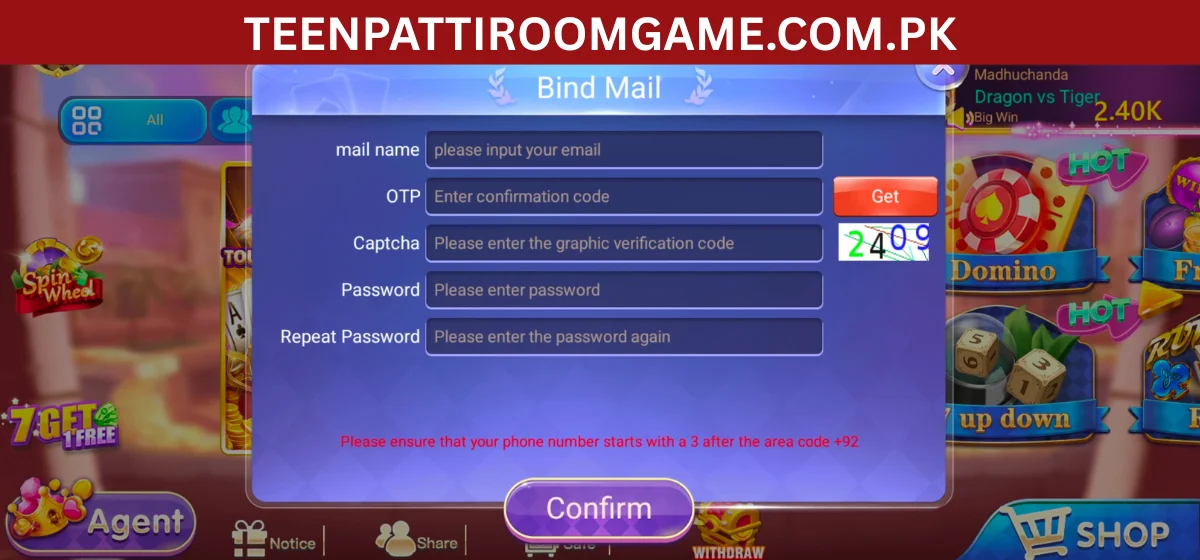
An account keeps wallet history, game records and support details tied to one identity. Complete registration with accurate information and bind a recovery method before adding funds.
Screens and verification requirements can change between releases. Follow the labels shown in the current app and never share a one-time code with another person.
Register and bind the account
Open the app, choose the registration option, and enter the requested mobile number or email. Create a unique password rather than reusing one from banking or social media. Enter a referral code only if you understand the applicable promotion.
After reaching the profile, bind the account to an email or phone number you control. Record your player ID privately; support may use it to locate the account, but it is not a substitute for proof of ownership.
Login and recovery checklist
Confirm the phone country code, remove accidental spaces from an email address, and check that the app is online. If the password fails, use the official recovery flow once and wait for the code instead of requesting many codes in quick succession.
- Check spam or filtered SMS folders
- Set device date and time to automatic
- Avoid VPN switching during verification
- Contact in-app support without sending your password or OTP
Protect access
Use a device screen lock, keep screenshots of transaction references out of public chats, and sign out on shared phones. Anyone asking for remote-control access, an advance “unlock” payment or your verification code should be treated as suspicious.
If the account appears compromised, stop transactions, change credentials from a trusted device and use the official support channel shown inside the app.